
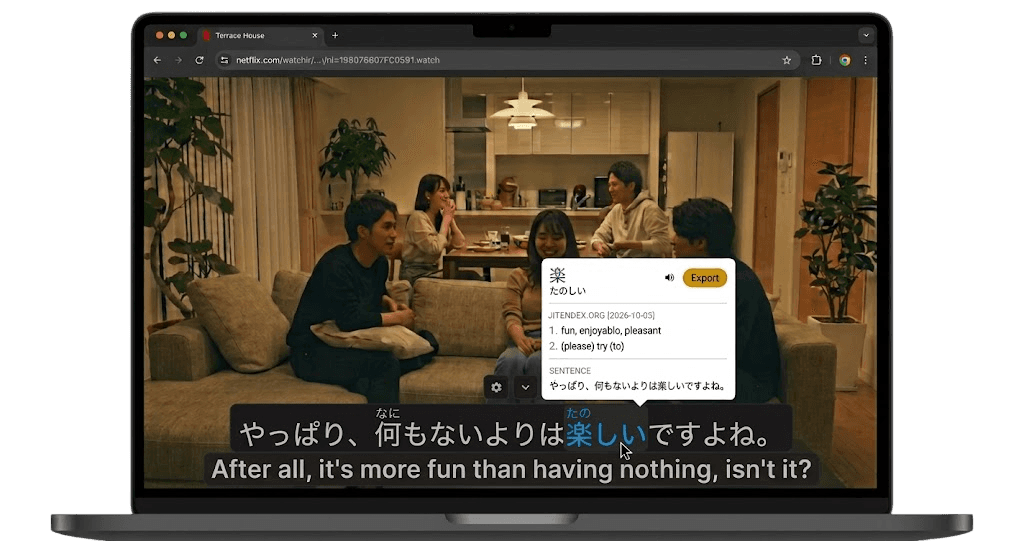

YuzuLingo vs hardsub-extractor (liuzhongze7)
YuzuLingo stays in the browser. You cover burned-in subtitles on the video you are already watching, including YouTube, Bilibili, and other web players. There is no video file to download. Turn on Interact to read the burned-in line on your device, with readings such as furigana, pinyin, romanization, or IPA when that language has them. Show that text always, on hover, or while you hold a hotkey.
hardsub-extractor is liuzhongze7’s command-line tool in the repo hardsub-extractor. You set up Python 3.12 or newer. It runs on Windows, Linux, and macOS, on the CPU, with no GPU. You point it at a local video. It measures the burned-in subtitle band, or you pass the band, and PaddleOCR PP-OCRv5 writes an SRT. The default language is Simplified Chinese plus English on the same entry. Other codes include traditional Chinese, English, Japanese, Korean, Vietnamese, Arabic, Spanish, French, German, and Russian. It can split one bilingual SRT into a Chinese file and an English file. If the file already has a text subtitle track, it tells you to pull that with ffmpeg and skip OCR. Setup fetches YaoFANGUK’s Video Subtitle Extractor, which uses VideoSubFinder to find the frames. hardsub review writes one frame per line, contact sheets, and a prompt. That pack stays on the machine. They recommend handing it to DeepSeek 4.1 Flash, which is off the device. Extract, lint, split, and proofread run with no model. They measured roughly seven minutes of extraction for a three-to-four minute video on one CPU-only desktop. The last commit was in September 2026. There is no GitHub release. This repo is MIT. It does not cover a web video while it plays.
 GitHub - liuzhongze7/hardsub-extractor: Extract burned-in (hardcoded) bilingual subtitles from video into SRT on any CPU - then let AI proofread every line against the actual frames. No GPU, no API key, offline. 视频硬字幕提取 + AI 逐帧校对
Where each one fits
| Feature | YuzuLingo | hardsub-extractor |
|---|---|---|
| Install in the browser, no Python project to set up | ||
| No video file to download | ||
| Cover burned-in subs while a web video plays | ||
| Read that burned-in line while the web video plays, on your device | ||
| Readings on that line (furigana, pinyin, IPA…) | ||
| Show that text always, on hover, or while you hold a hotkey | ||
| Turn a local video’s burned-in subs into an SRT | ||
| Measure the subtitle band for you | ||
| Draw or set the subtitle band | ||
| OCR stays on the device | ||
| Split one bilingual SRT into Chinese and English files | ||
| A review pack: one frame per line, contact sheets, and a prompt | ||
| If the file already has a text subtitle track, pull that instead of OCR | ||
| Batch more than one video when the band matches | ||
| Choose a faster pass or a slower, more precise pass | ||
| Add the line to an Anki deck |