
YuzuLingo vs YT-Sub-OCR (krmanik)
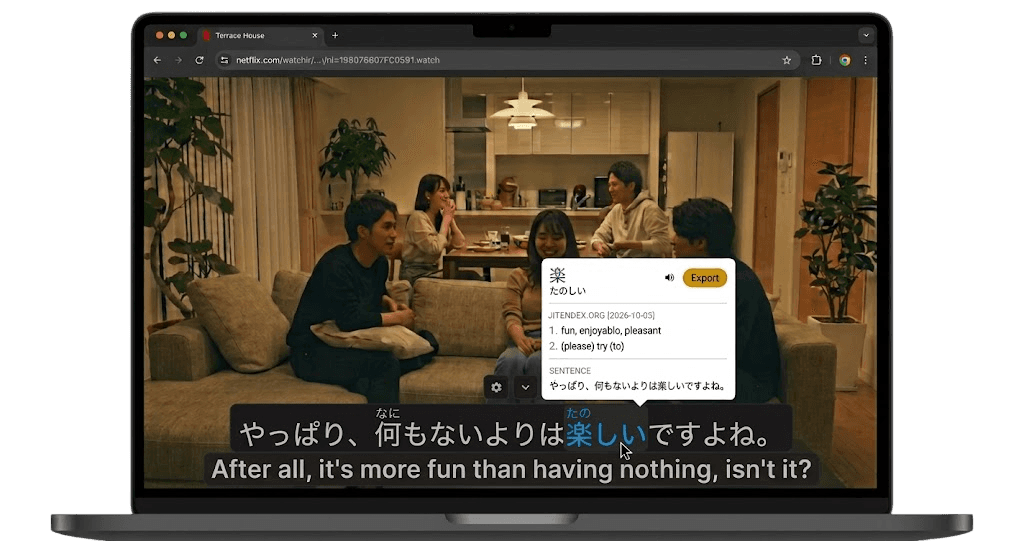
YuzuLingo stays in the browser. You cover burned-in subtitles on the video you are already watching, including YouTube, Bilibili, and other web players. There is no video file to download. Turn on Interact to read the burned-in line on your device, with readings such as furigana, pinyin, romanization, or IPA when that language has them. Show that text always, on hover, or while you hold a hotkey.
YT-Sub-OCR is krmanik’s userscript in the repo yt-sub-ocr. You need a userscript manager. The script matches youtube.com and m.youtube.com watch pages. You click Crop, draw the area, then click OCR. The video pauses, paddlejs-ocr reads that one frame in the browser, and the text shows under the player. Buttons also pause or play, and step five seconds. The crop is saved in the browser. The script loads Cropper.js from jsDelivr and paddlejs-ocr from the project’s GitHub Pages. The userscript header says version 1.0.0 and GPL-3.0. GitHub does not list a license file. The only commit was in June 2024. There is no GitHub release. It does not cover the line, it does not keep reading while the video plays, and it does not write an SRT.
 GitHub - krmanik/yt-sub-ocr
Where each one fits
| Feature | YuzuLingo | YT-Sub-OCR |
|---|---|---|
| Install from the browser store | ||
| No video file to download | ||
| Cover burned-in subs while a web video plays | ||
| Read that burned-in line while the web video plays, on your device | ||
| Readings on that line (furigana, pinyin, IPA…) | ||
| Show that text always, on hover, or while you hold a hotkey | ||
| Works on Bilibili and other web players, not only YouTube | ||
| Draw the subtitle crop | ||
| Click OCR to read the current frame, and the video pauses | ||
| OCR stays in the browser | ||
| Add the line to an Anki deck |